From a traffic spreadsheet to a calculated and traceable operation
A company centralized security traffic, truck routes, and settlements in an Excel-like grid with formulas, triggers, and audit logs.

custom software
We design and build robust, scalable and secure software aligned with your business goals. From idea to impact.
1. Discovery
We understand your business, challenges and goals to define the right strategy.
2. Design
We design the solution, architecture and an experience focused on value and usability.
3. Agile development
We iterate, build and validate with you through short delivery cycles.
4. Testing & quality
We ensure quality, security and performance in every release.
5. Deployment & support
We deploy, measure results and support you continuously.
Scalable systems
Modern architectures designed to grow with your business.
Built-in security
We protect your data with strong practices and standards.
Smart integrations
We connect your systems and automate key processes.
Data for decisions
We turn data into actionable information for your business.
Cloud & DevOps
Reliable deployments, monitoring and continuous improvement.
Committed teams
Senior talent with real commitment to every project.
The challenge: controlling security traffic without relying on a fragile spreadsheet
A security and logistics company coordinated the movement of 18 trucks and semi-trailers, the work of 126 workers, and more than 3,200 monthly routes from four operating bases. The traffic team needed to know which vehicle was leaving, its origin and destination, the assigned driver and assistant, its schedule, and the corresponding route sheet.
The original spreadsheet concentrated timestamps, order numbers, transportation type, origin, destination, assigned staff, presentation, departure, arrival, final time, customer, mileage, tolls, overtime, license plates, notes, and payment amounts. It was more than a register: its formulas decided how much each route was worth and fed the subsequent monthly settlement.
The complexity came from business-dependent rules. A short route could use the monthly value agreed with a customer, while a long-distance service could be calculated by mileage. Tolls and overtime changed the amount, and the result was different for the driver and assistant. Security and office hours used other rates based on the position, customer, worker, and effective period.
The team needed to retain spreadsheet-level entry speed while eliminating duplicate versions, incorrectly copied formulas, and the difficulty of reconstructing who had changed a value. The challenge was turning the traffic logic into a system capable of recalculating values, triggering actions, and recording every modification.
The solution: a traffic grid governed by formulas and events
The workflow begins when administration configures the effective values for customers and workers. Each rate is linked to a period so that a future update does not silently change historical routes.
An operator opens the traffic grid and creates a row. The operator selects the customer, driver, assistant, and vehicle, then enters the origin, destination, schedules, mileage, tolls, overtime, license plate, and route sheet. Related data comes from the API, while validations control dates, amounts, required selections, and consistency before saving.
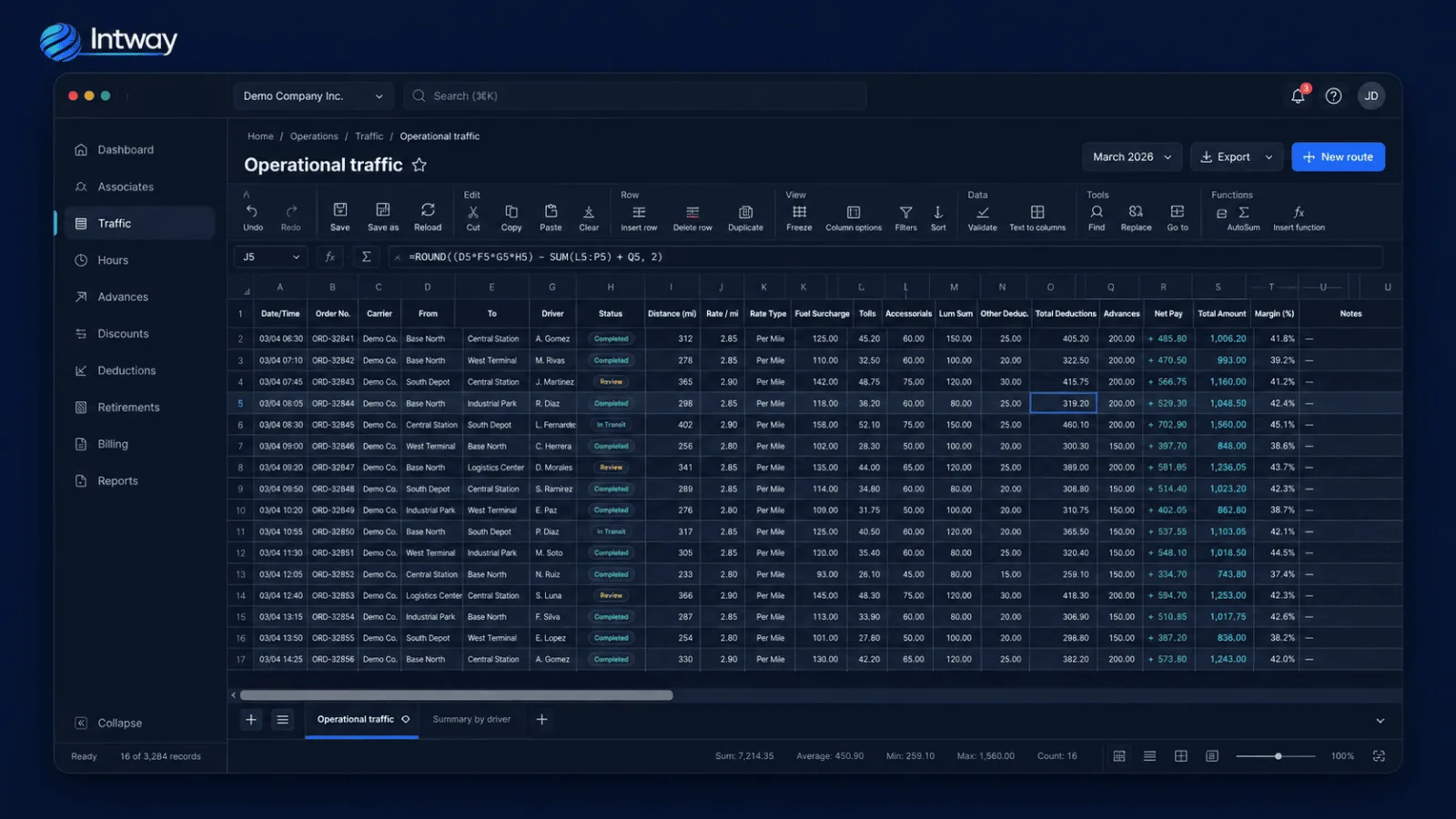
Once the required variables are available, the engine interprets declarative formulas with cell references and Excel-like functions. IF resolves conditions, GET queries properties from the selected customer or worker, and SUM consolidates amounts. A route rule can choose a customer value or a mileage calculation and then add tolls and overtime.
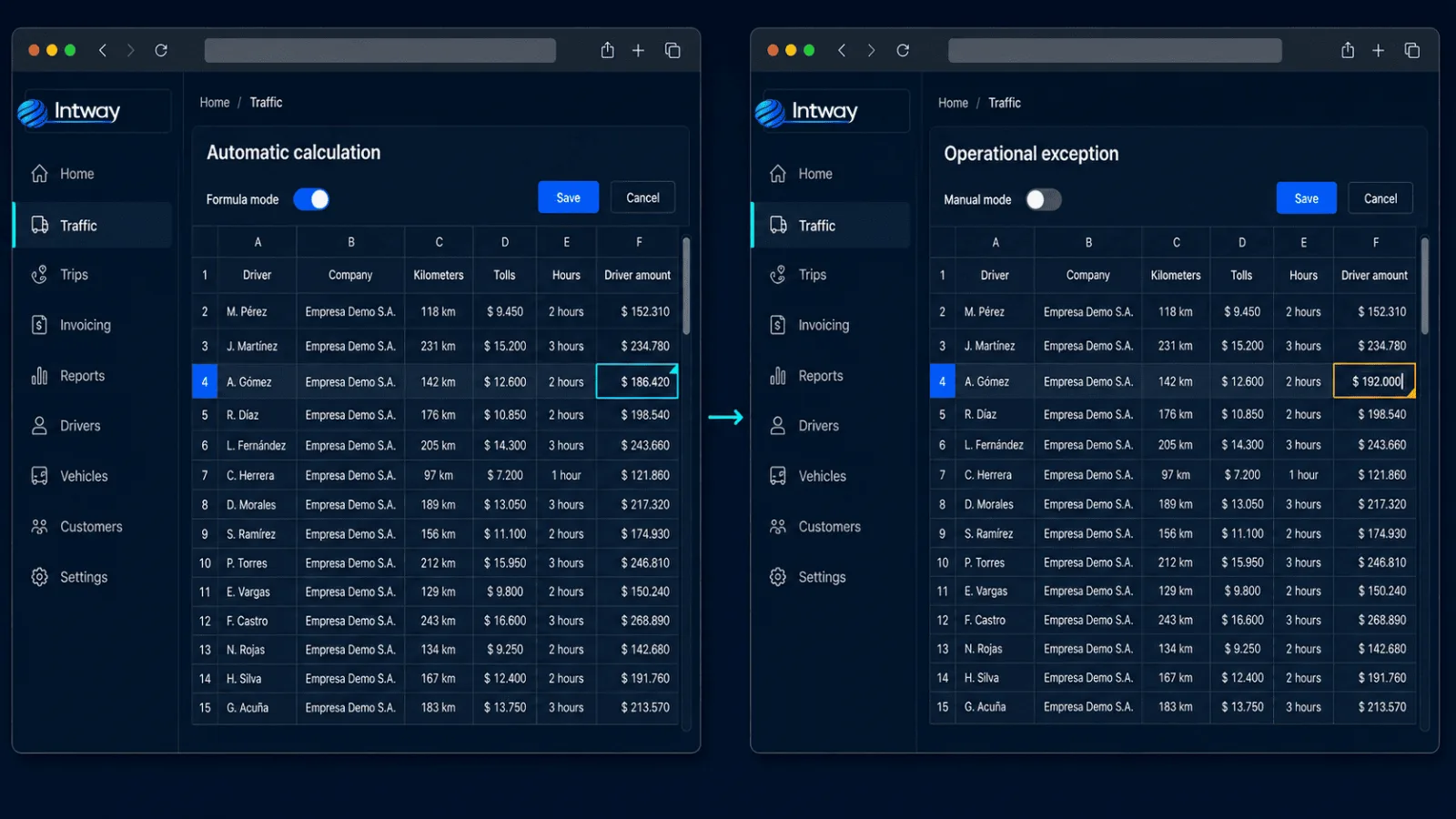
Every calculated amount has two states. In Formula mode, changing the mileage, customer, toll, or schedule triggers recalculation of dependent cells. In Manual mode, an authorized user can resolve an operational exception without changing the rule used by all other routes.
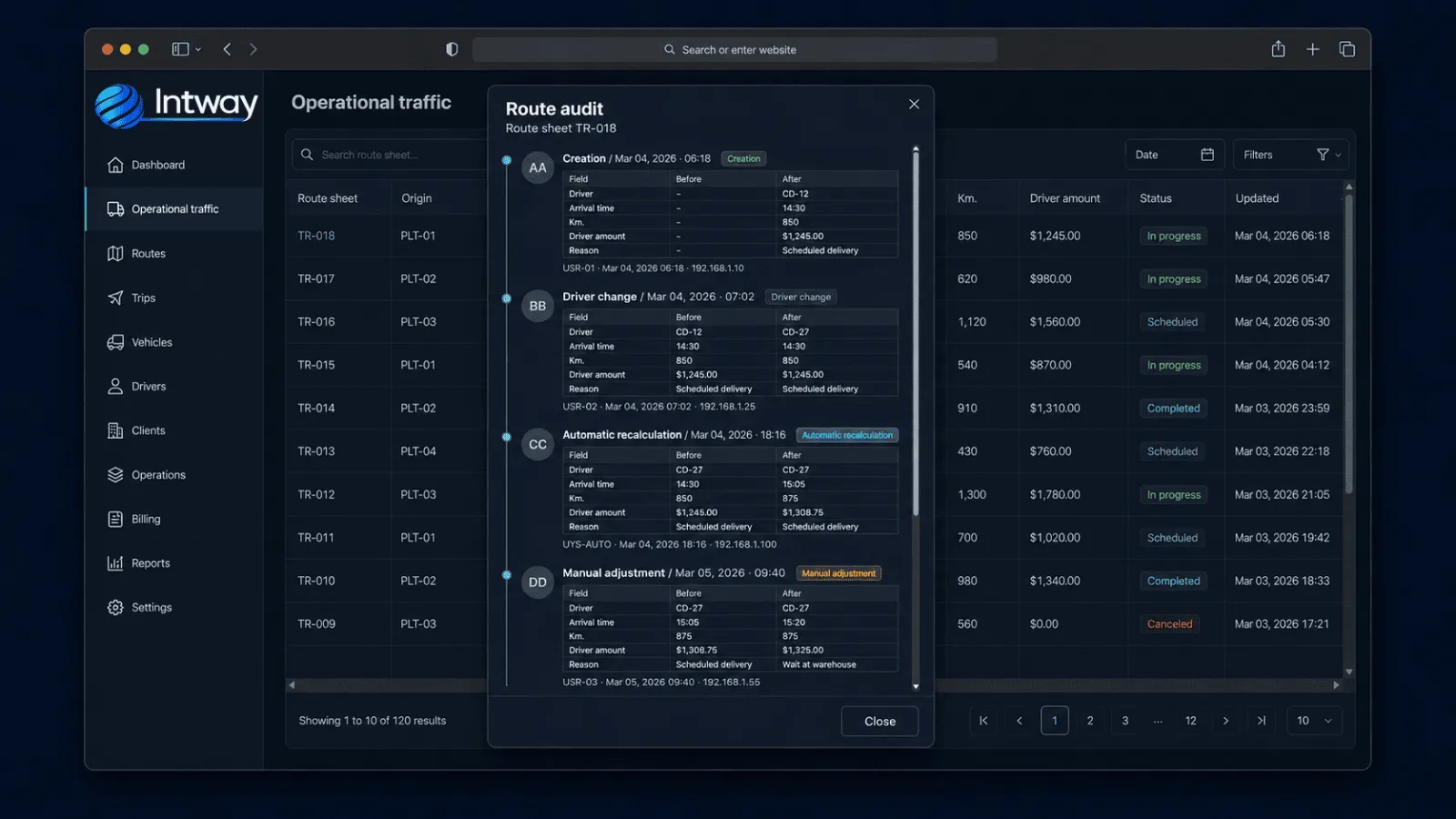
The triggers extend beyond the visual calculation. When a change is saved, the platform records the previous state, the new value, affected fields, user, timestamp, and IP address. A rate change can trigger recalculation of routes and working hours related to that customer or worker, limited to the applicable period.
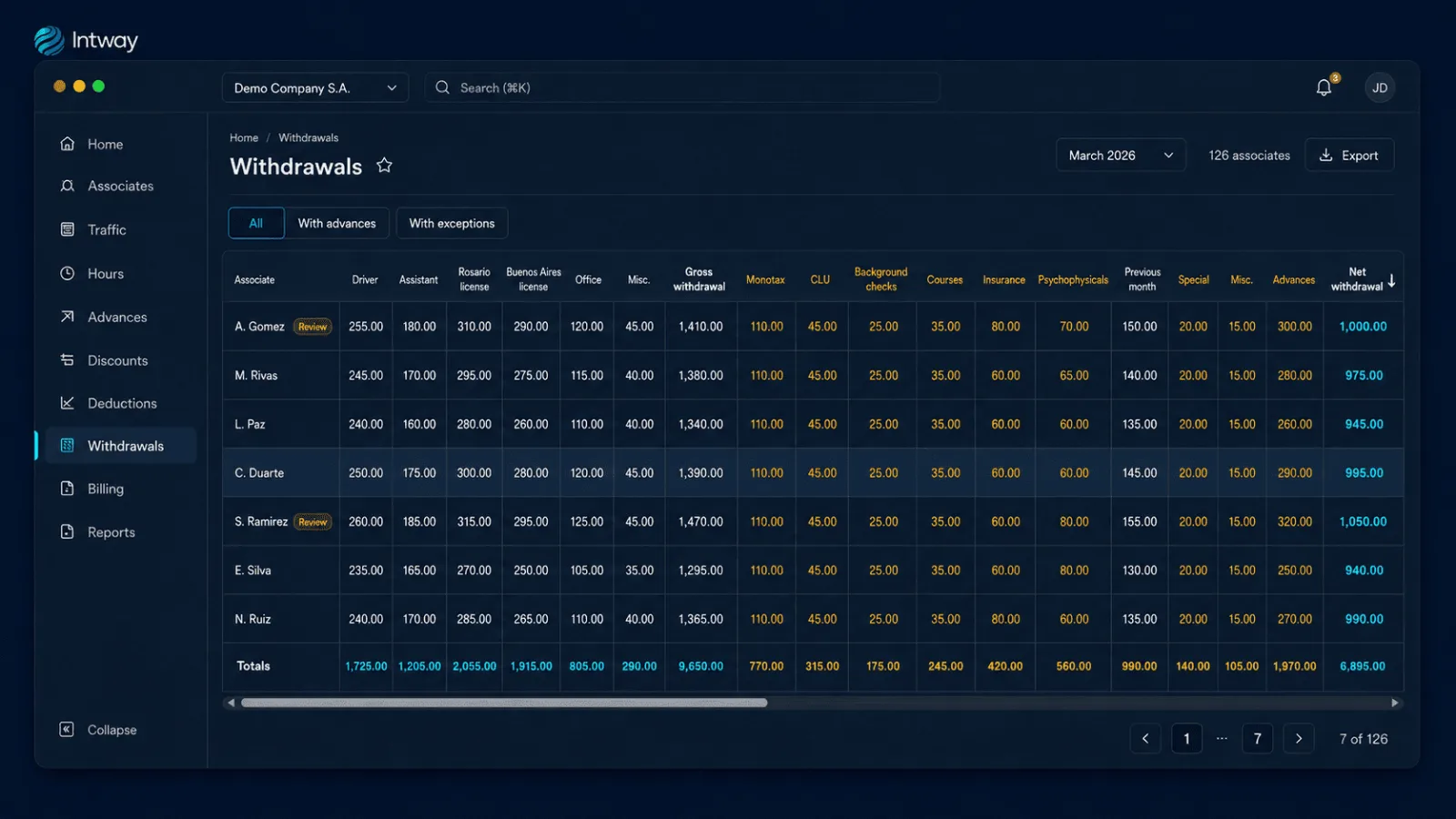
The same engine calculates security hours according to position and effective rate. During monthly closing, the platform consolidates routes completed as a driver and assistant, security hours, office hours, and other payments. It then applies advances and nine deduction categories to obtain each worker's gross and net settlement.
Platform architecture
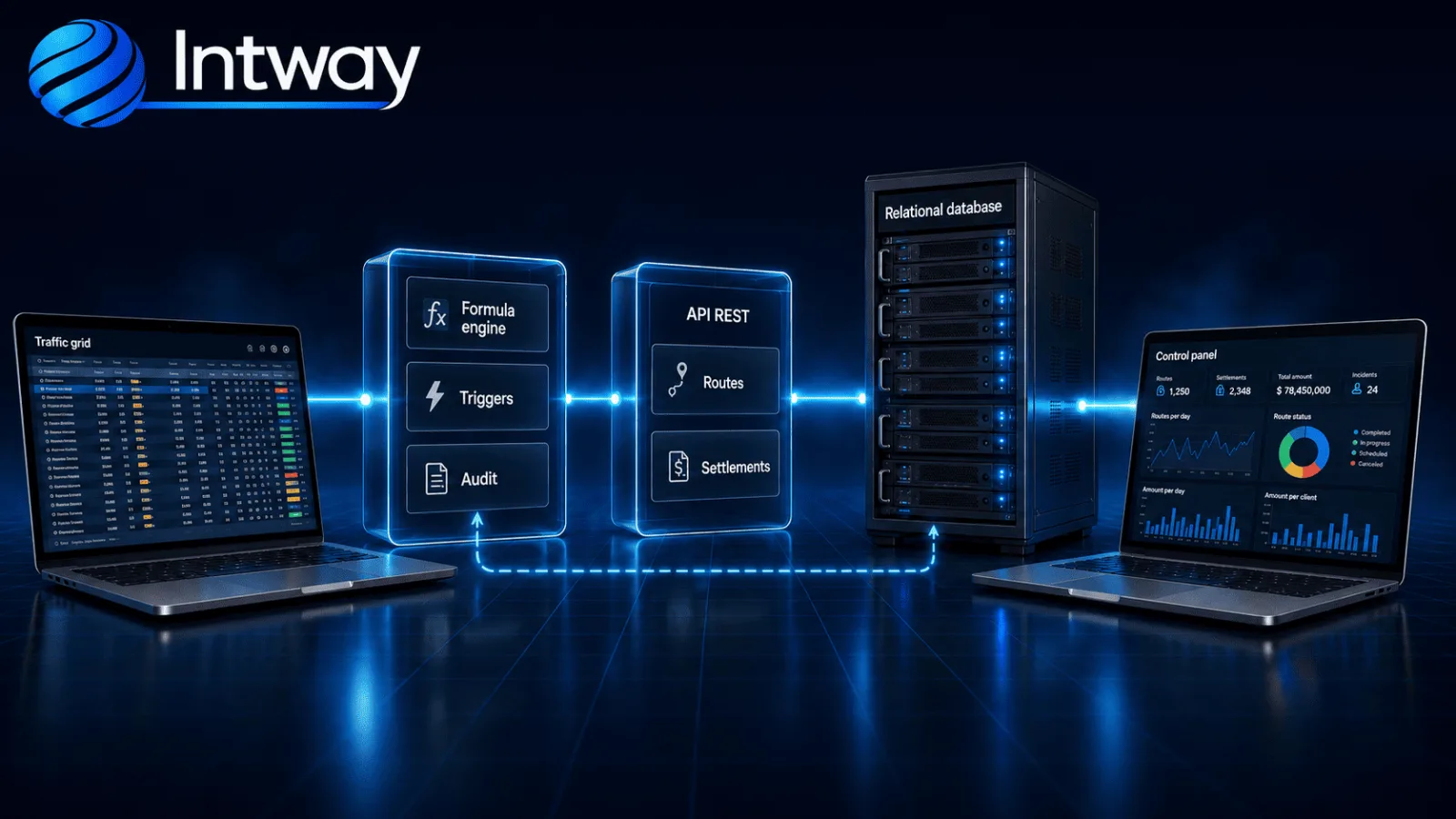
The web application uses Next.js and React to reproduce the row-and-column interaction familiar to the team. The API delivers each field's definition, including control type, validation, data source, format, permissions, and formula. The same component supports routes, working hours, customers, advances, deductions, and settlements.
The formula engine responds while the operator works. The NestJS API validates and persists the operation, executes recalculation triggers, and records whether each amount remains formula-driven or has been manually overridden.
The relational database stores routes, effective-dated rates, workers, customers, and audit records. Consolidation processes group amounts by worker and period to produce the settlement. Electronic invoicing uses the same commercial data to query the taxpayer registry and issue documents through AFIP.
The implementation: turning spreadsheet knowledge into a platform
The main decision was separating the data-entry experience, calculation engine, and persistent rules. The grid retains XLS productivity, formulas express route logic, and the API ensures that data, effective dates, permissions, and events are applied consistently.
When the business changes, a rule can add another condition, query a new related value, or change an amount calculation without rebuilding the complete grid. Formula-driven records adopt the current logic, while manual exceptions remain visible.
The result is a platform that controls security traffic from truck departure through worker settlement. The company retains a familiar entry method while gaining adaptable calculations, selective recalculation, audit logs, and a centralized view of the entire operation.
Why you will not see the client name
We work under non-disclosure agreements: we do not publish company names, commercial data, or technical details that could compromise our clients' operations. The metrics in this case study are real and validated with them. Need more detail to evaluate us? We can expand on it under NDA.
Other case studies
How to replace a Visual Basic payroll engine with a multi-country cloud platform
We replaced a Visual Basic payroll core and ASP Classic screens with a secure, auditable cloud platform for multi-country payroll operations.
Face recognition time and attendance software: how 300 companies run payroll from the punch itself
A system where people punch in by looking at a tablet, and that record pays their wages. More than 300 companies.