The report closes in the machine room, not two days later
A field service company replaced the paper report with an app that closes the visit on site, even with no signal.
The challenge
An HVAC field service company with 34 technicians on the road maintained around 3,800 units installed in office buildings, clinics, warehouses and offices. Every visit ended with a paper work report: the technician filled it in on site, kept it in a folder and handed it in when back at base, one or two days later. Only then did someone enter it into the management system.
The problem was not the data entry: it was everything that happened in between. Parts used were deducted from stock at month end, when nobody remembered exactly what had gone where. One in three reports came back without the customer's signature, and without a signature there was nothing to back the invoice. And when another technician went to the same unit weeks later, they had no idea what had been done last time: the information sat in a folder, not in the unit's record.
They had already tried an off-the-shelf app. It failed for a simple reason: the units sit in machine rooms, basements and rooftops, where there is no signal. The app needed a connection to save, so the technician ended up refilling the report outside, from memory, or simply going back to paper as always.
The solution
We built a field technician app designed from day one to work without connectivity, plus a dispatch board for the base. The circuit starts when the dispatcher logs a request — unit, address, urgency according to the contract — and assigns it to a technician. The order lands on the phone with the unit's record: the last three visits, which parts were replaced and what failed.
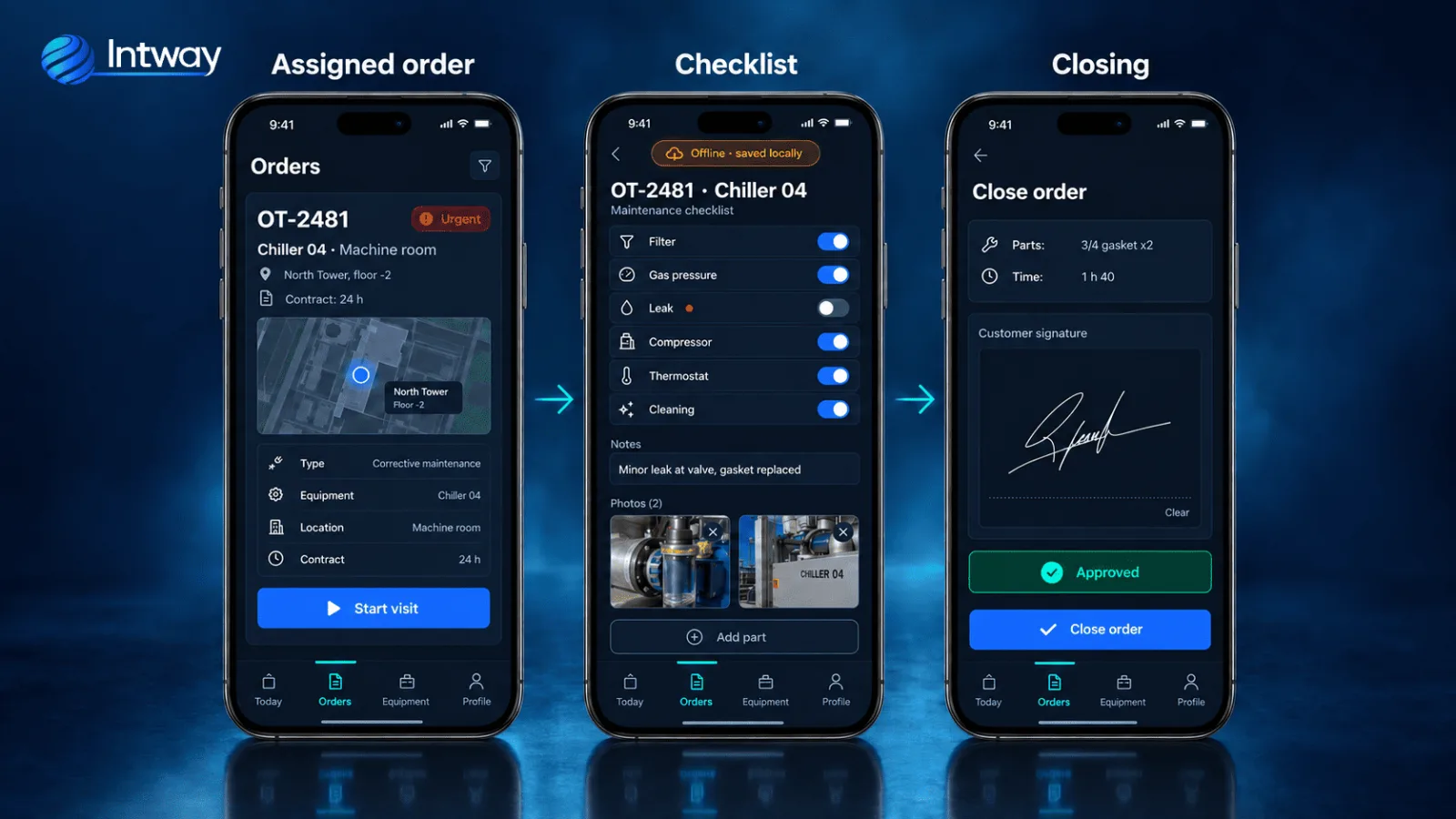
The technician opens the order, taps "Start visit" and completes the checklist specific to that equipment type: six checks for a chiller, four for a split unit. They add notes, take photos, and log the parts used by scanning the barcode on the box. If they are in a basement with no signal, the app shows it with an amber band — "No connection · saved locally" — and keeps working exactly the same: everything is stored in the phone's local database.
When finished, the customer signs on the screen and the order closes right there, with the time, the location and the total duration of the visit. When the phone regains the network — in the elevator, on the street, at the next customer — the local queue empties on its own: the order, the photos, the signature and the parts consumption travel to the server without the technician doing anything.
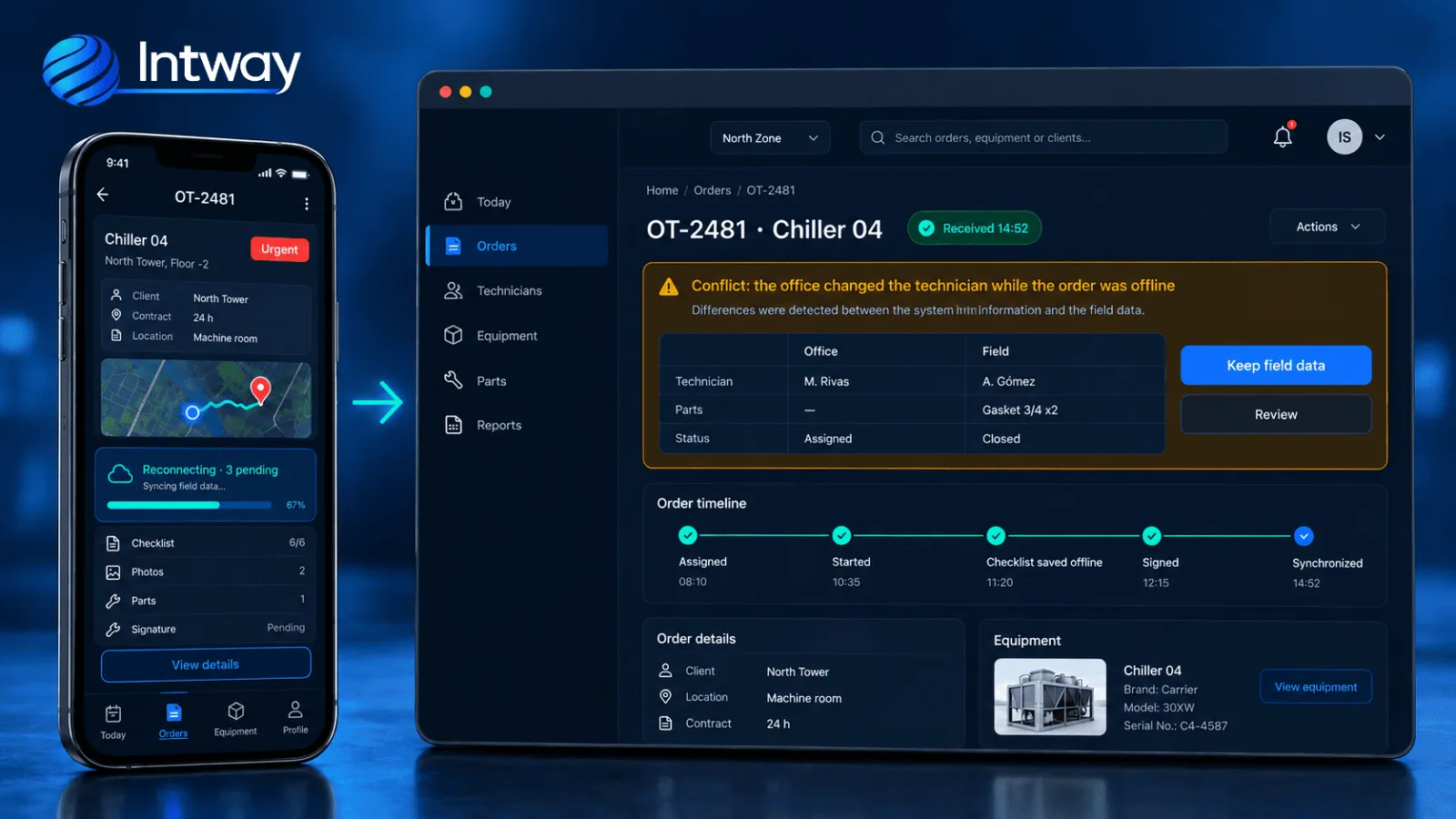
The hard case is the conflict: the office reassigned the order to another technician while the first one was already inside working with no signal. When the sync arrives, the system overwrites neither version. It applies an explicit rule — what was done in the field with the customer's signature wins — and shows the dispatcher both versions side by side, with a button to keep the field version or review. Nothing is lost silently.
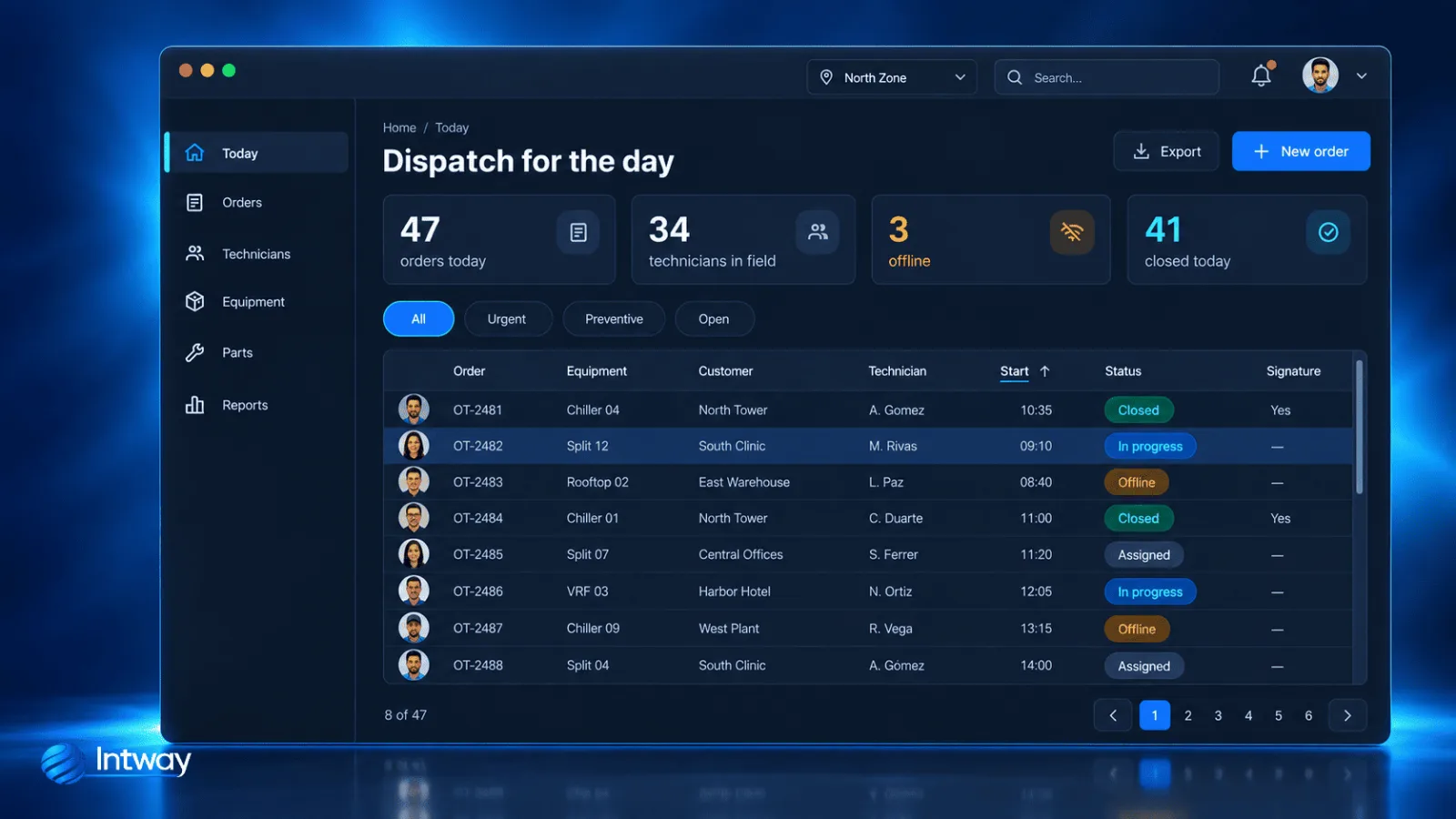
From the board, the dispatcher sees the whole day: how many orders there are, how many technicians are on the road, which ones are currently offline and which have already closed. Every row carries the real state of the order and whether it has the customer's signature, which is what the admin team needs to invoice without waiting for the folder.
Platform architecture
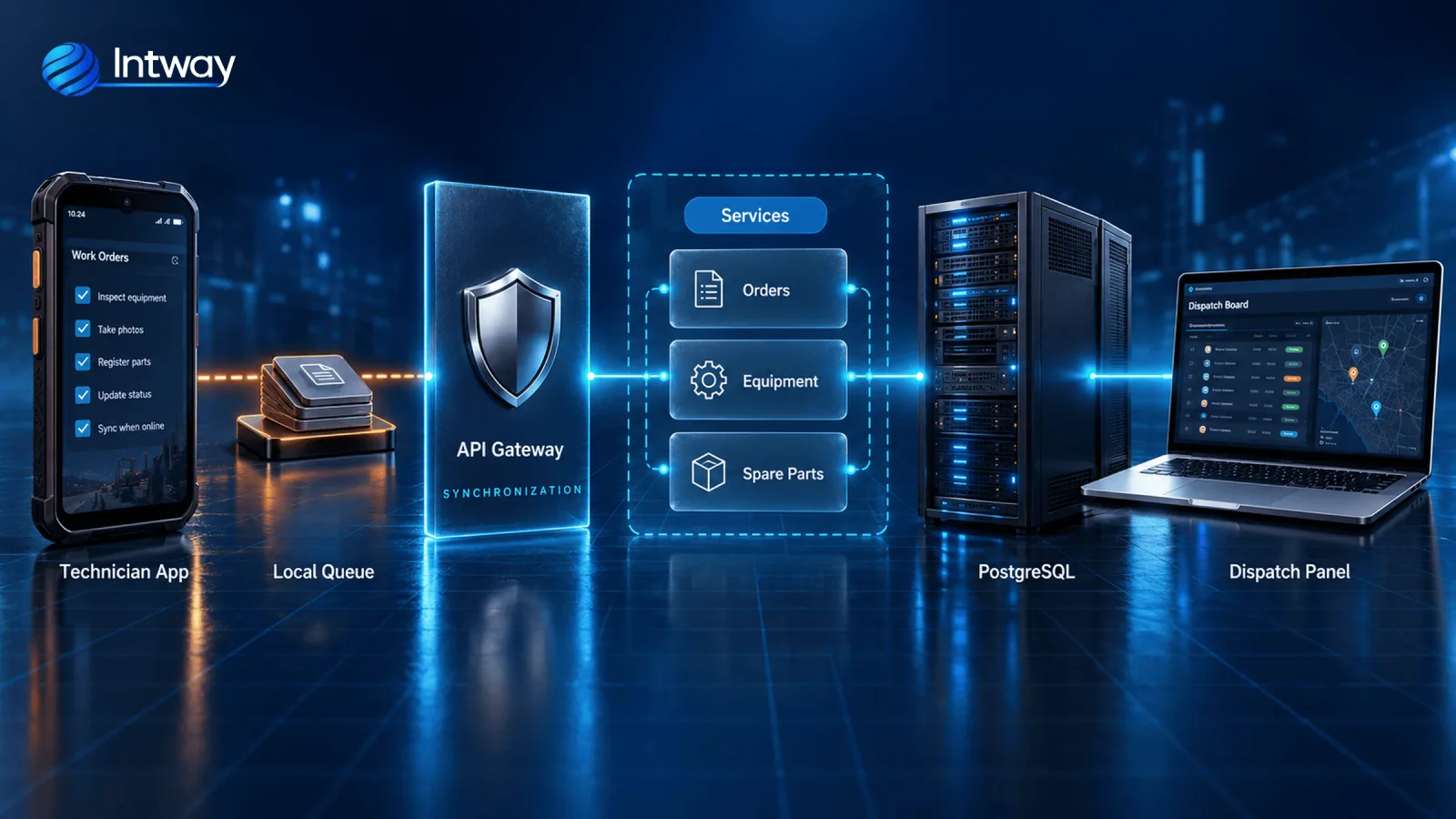
The app runs on Android on React Native, with a local SQLite database that is the source of truth while there is no network. Every technician action — opening the order, ticking a check, logging a part, capturing the signature — is written to that database first and enters a sync queue with a unique identifier per operation. The app never waits for the network to respond.
When connectivity is available, a background process drains the queue against a REST API in Node.js. Every submission is idempotent: if the phone sends the same operation twice because the response was cut off, the server recognizes it by its identifier and does not duplicate it. Photos travel separately, compressed, and the order can be closed even while the images are still uploading.
It is the same pattern we use in the face recognition time and attendance system, where the punch is also captured on site and travels once there is a network.
Conflicts are resolved on the server with per-field rules, not per whole order: the technician assignment is won by the office, but the report contents, the parts and the signature are won by the field. The dispatch board shows the outcome and allows review. PostgreSQL stores the orders, each unit's record with its history, and parts consumption, which hits stock when the order closes, not at month end.
The implementation
The decision that defined the project was building offline mode first, not later. We started with a single equipment family — chillers — and a group of six technicians, with the app running in airplane mode from the first week of testing. If the checklist could not be completed in a basement, it was not fit for purpose, and that was tested before anything else.
The second decision was not to digitize the paper report as it was. We mapped with the technicians which checks they actually performed on each equipment type and built one checklist per family, instead of a generic form with a notes field where everything used to go. Historical paper reports were not migrated: each unit's history was built from the first visit with the app, and within three months it covered most of the installed base.
The remaining equipment families and technicians came in by stages, with paper running alongside for two weeks in each group as a fallback. The dispatch board was connected to the existing management system through an API so a closed order feeds invoicing without re-entering anything.
| Indicator | Before | After |
|---|---|---|
| Report closing | 2 days | Same day |
| Reports without customer signature | 31% | 2% |
| Parts not deducted until month end | 18% | 0% |
| Repeat visits for lack of history | 14% | 5% |
Frequently asked questions
What happens if the phone breaks before syncing?
Pending orders live in the device's local database, so they are lost with it. That is why the app syncs the moment it detects a network, even for a few seconds, and the board shows how many pending operations each technician has. In practice an order rarely stays unsent for more than an hour.
How is it resolved when the office and the technician changed the same order?
With per-field rules, not per whole order. The office decides the assignment; the field decides the report contents, the parts and the signature, because they are what actually happened. The board shows both versions and allows review before confirming.
Is the on-screen signature valid for invoicing?
The signature is tied to the order with date, time, location and the report contents at that moment, and the customer receives a copy. It serves as acceptance of the service delivered; specific legal validity depends on the contract and the jurisdiction, and is worth reviewing with legal counsel.
Can the history from paper reports be migrated?
It can, but it is not always worth it. In this case the decision was not to load the old reports and to build the history from the first visit with the app: within three months it covered most units and was more reliable than what was in the folders.
Can each equipment type have its own checklist?
Yes, and that is what makes the technician complete the report instead of writing everything into notes. Equipment families are defined with their checks, and the app loads the right checklist based on the unit on the order.
Does it integrate with the management system the company already uses?
Yes. A closed order feeds invoicing and stock through an API, without re-entering anything. Before committing to scope we verify which operations the existing system exposes and with what limits.
Why you will not see the client name
We work under non-disclosure agreements: we do not publish company names, commercial data, or technical details that could compromise our clients' operations. The metrics in this case study are real and validated with them. Need more detail to evaluate us? We can expand on it under NDA.